issy
- why
- two themes
- print to pdf
- multiple cursors
- incremental search
- keyboard and mouse selection
- system clipboard
- wide glyphs
- path completion
- swap files
- per-file cursor memory
- opt-in editing aids
- install
- cross compile
- usage
- keybindings
- configuration
- syntax highlighting
- auto update
Source lives at github.com/davidemerson/issy.
issy is a text editor that cares about typesetting, a little. It’s written in Zig, runs on Linux, macOS, and OpenBSD, and ships as a single binary. Current release is v1.4.1.
why
I spend a lot of my day staring at text, and I wanted something with my own hotkeys and my own style preferences. But not something bloated.
Most of all, I wanted a real print path. I want the PDF to look typeset, not like someone screenshot a terminal and hit print.
two themes
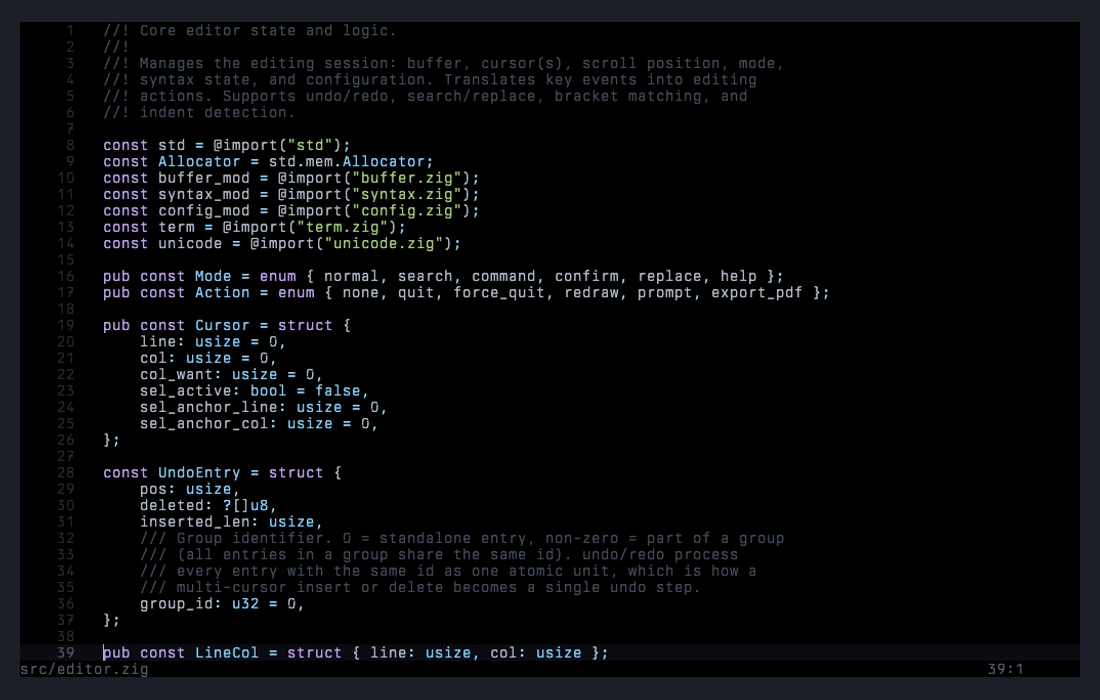
the default theme. black background, violet keywords, soft green strings, dim comments.
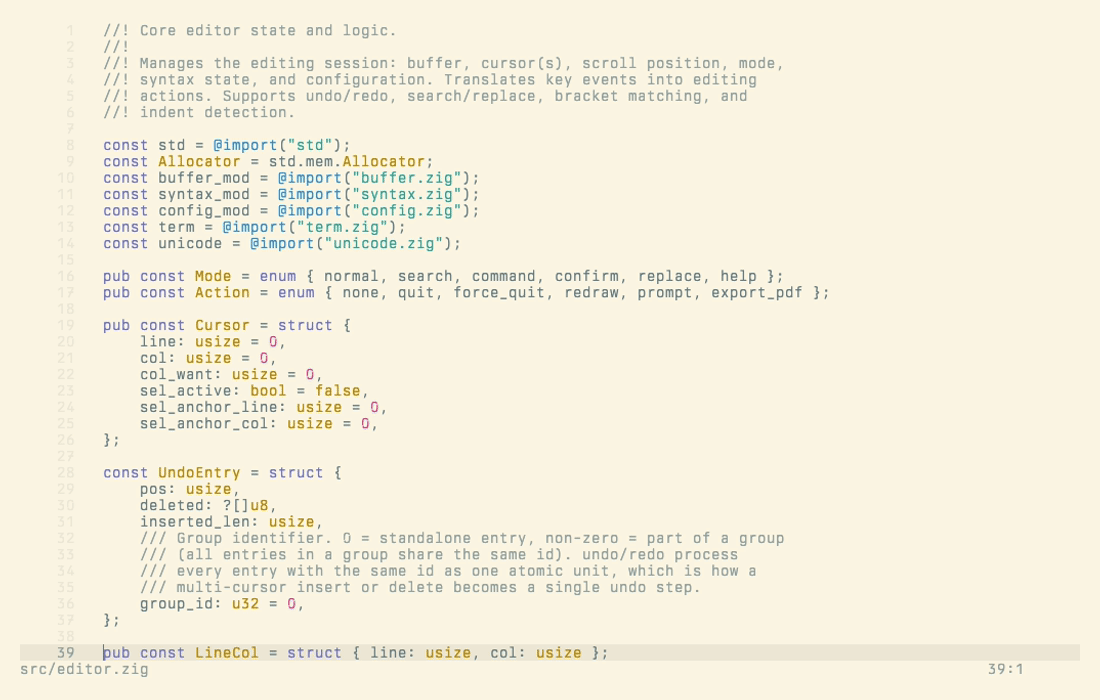
the paper theme. Solarized Light, warm cream background, violet keywords, cyan strings. Designed for readability in bright environments.
Every color in either theme can be overridden per-key in ~/.issyrc.
print to pdf
Ctrl+P (or --print on the command line) renders the current buffer to a real PDF 1.4 file.
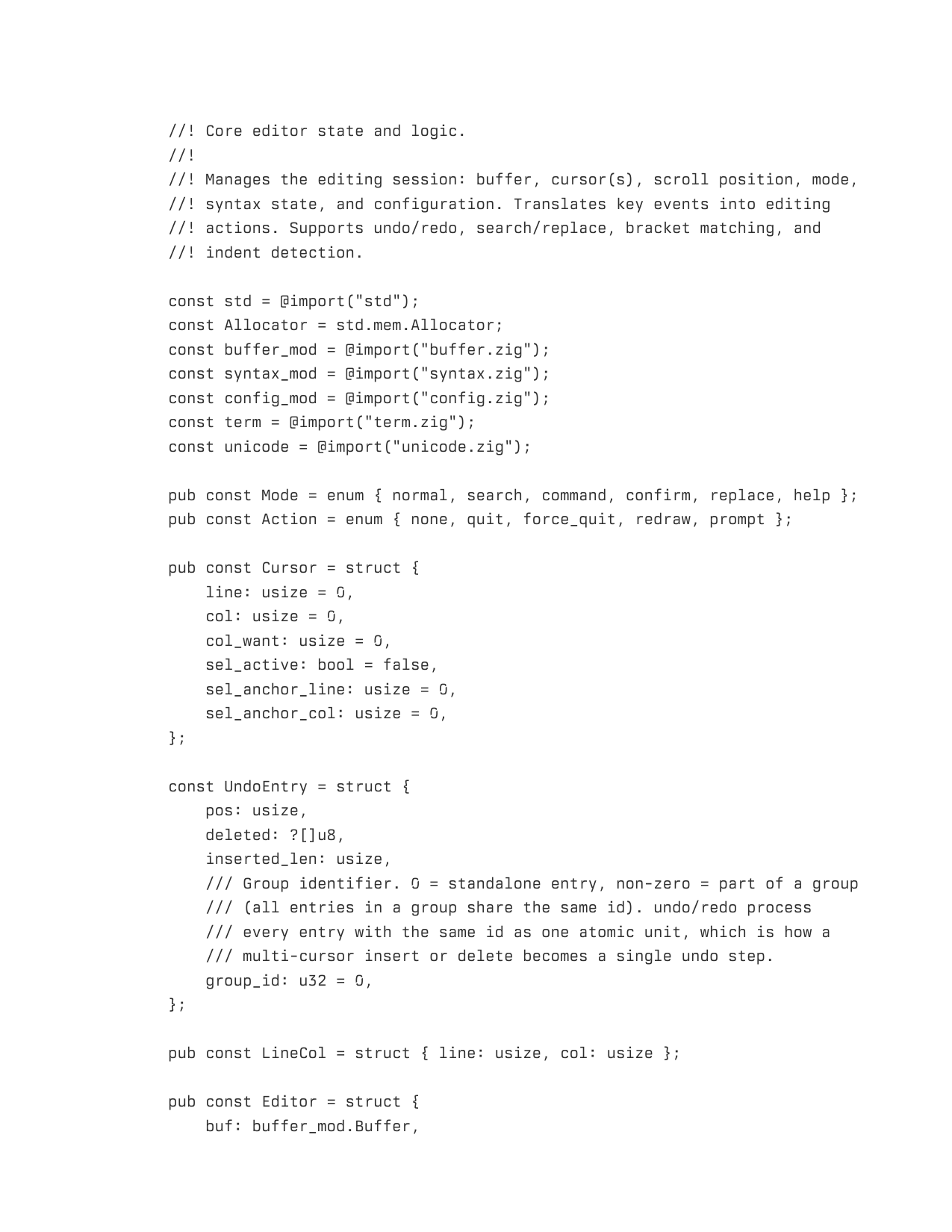
Headless from the command line:
issy --font "Berkeley Mono.ttf" --print output.pdf source.py
The print theme is tuned for ink on white paper. Recommended fonts: Berkeley Mono, Iosevka, JetBrains Mono, Commit Mono. Font metrics are sanity-checked on load to be sure you’ve made a sensible choice.
multiple cursors
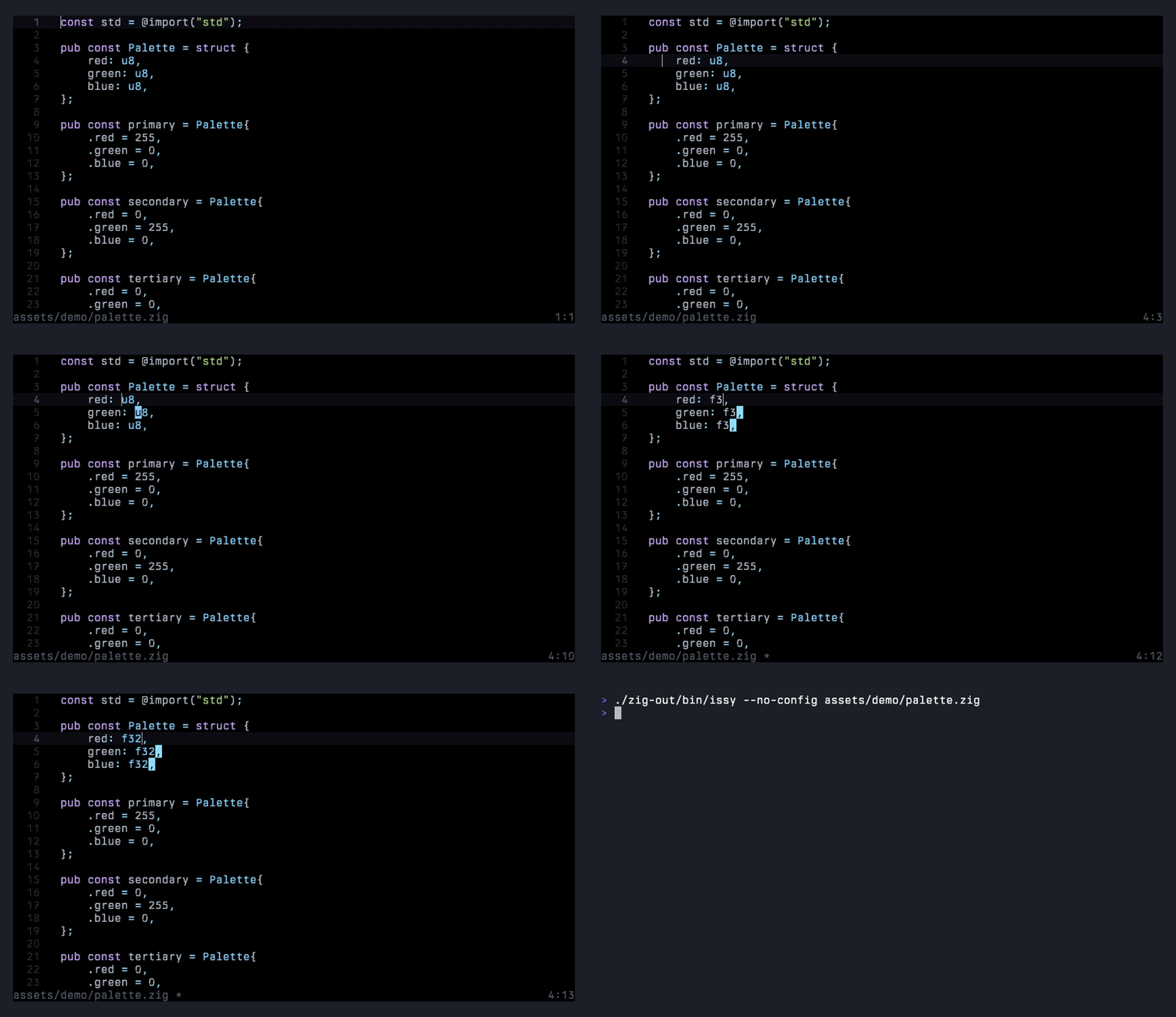
Ctrl+D selects the word under the cursor and adds a cursor at the next occurrence. Press it again to keep adding. Each press arms a rename: the word is highlighted at every secondary cursor, and the first character you type replaces it everywhere in one shot. From there, every edit, whether typing, Enter, Tab, backspace, delete, or paste, applies at all cursors simultaneously, and Ctrl+Z undoes the whole multi-cursor tick as one step.
incremental search
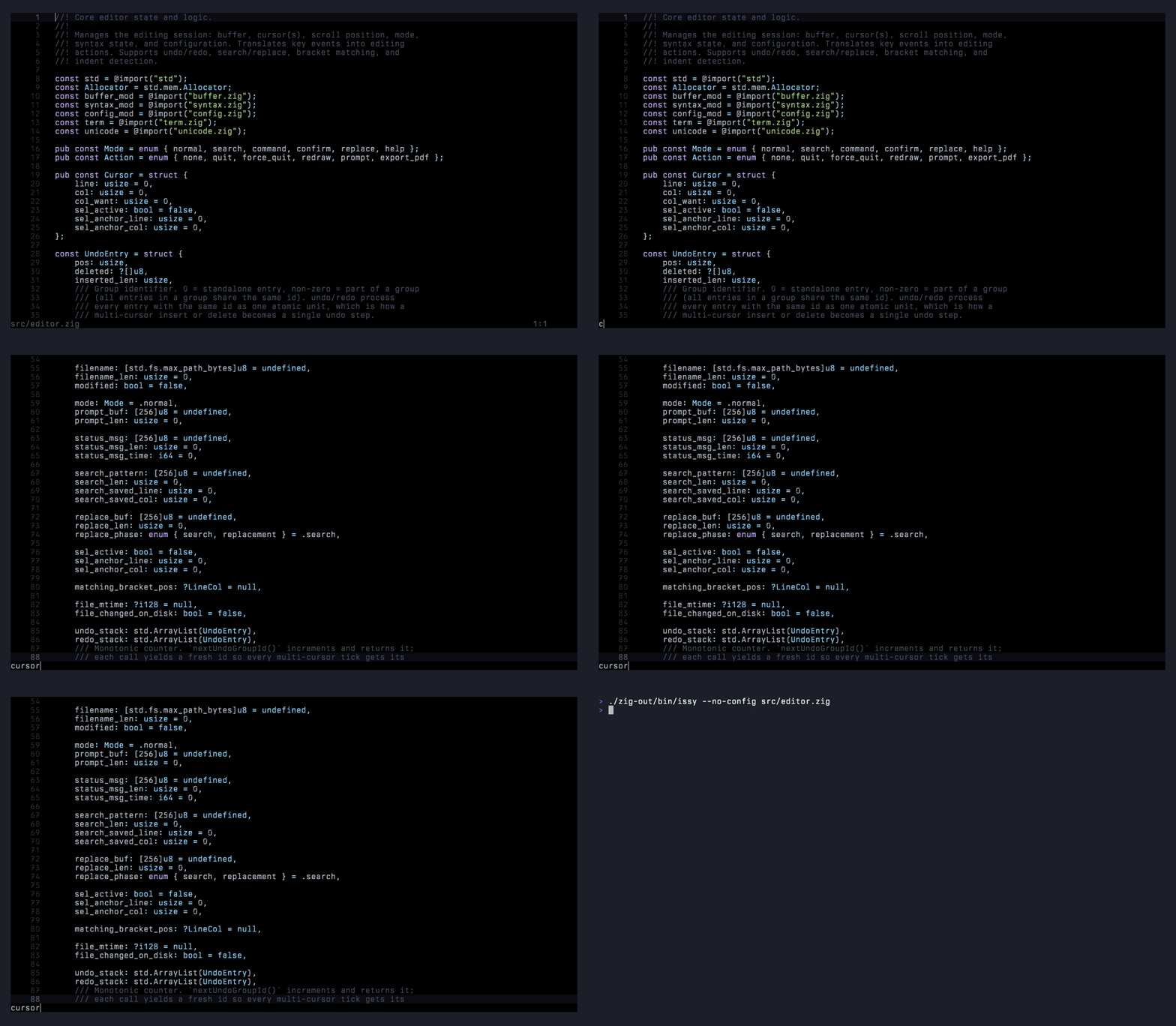
Ctrl+F enters search mode; each keystroke re-runs the search from the position where you started and jumps the cursor to the first match. While the prompt is open, every visible match is highlighted, the match at the cursor is underlined, and a dim 3/17-style counter sits after the pattern. Search is smart-case: all-lowercase patterns match case-insensitively, any uppercase letter makes the match exact. Tab toggles whole-word matching (shown as [w] in the prompt). Down or Ctrl+G walks to the next match, Up walks to the previous one, Enter confirms, and Escape cancels and returns the cursor to where it started.
keyboard and mouse selection
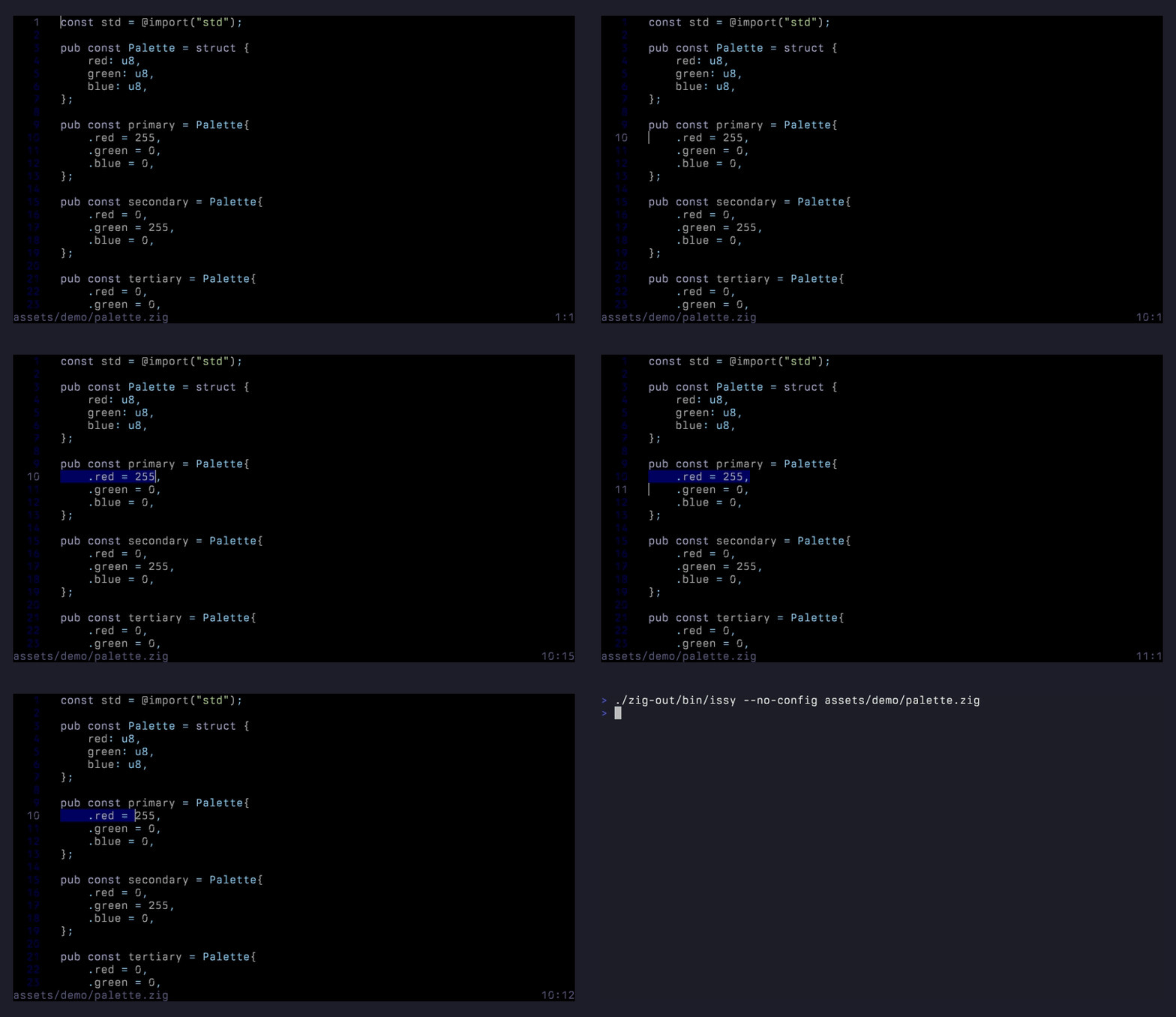
Shift with an arrow key extends the selection one character at a time; Ctrl+Shift+Left and Ctrl+Shift+Right grow it a word at a time. Click places the cursor, double-click selects the word under it, triple-click selects the line, and shift-click extends from the existing anchor. Drag past the viewport edge and the view autoscrolls.
system clipboard
Copy and cut push to the OS clipboard via OSC 52, so copying from an SSH session lands in the host clipboard without extra plumbing (tmux wants set -g set-clipboard on first). Copies over 100KB stay internal-only with a status notice.
Since v1.3.0 the read direction works too. Ctrl+V asks the terminal for the system clipboard over OSC 52, so text copied in any other application pastes straight in, and middle-click pastes the primary selection the same way.
wide glyphs
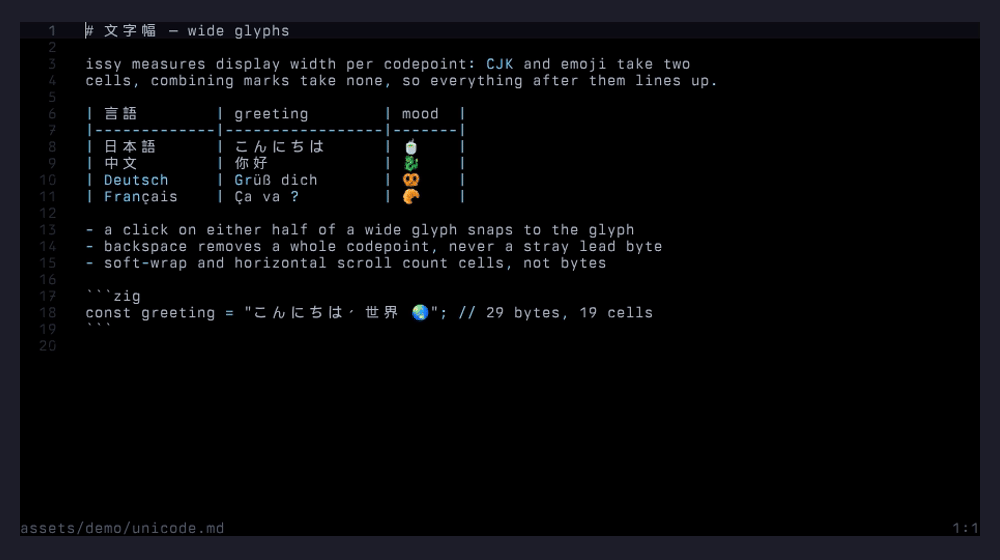
Wide text renders in place rather than as blanks, the cursor lands on the glyph you’d expect, and a click on either half of a wide glyph snaps to it.
path completion
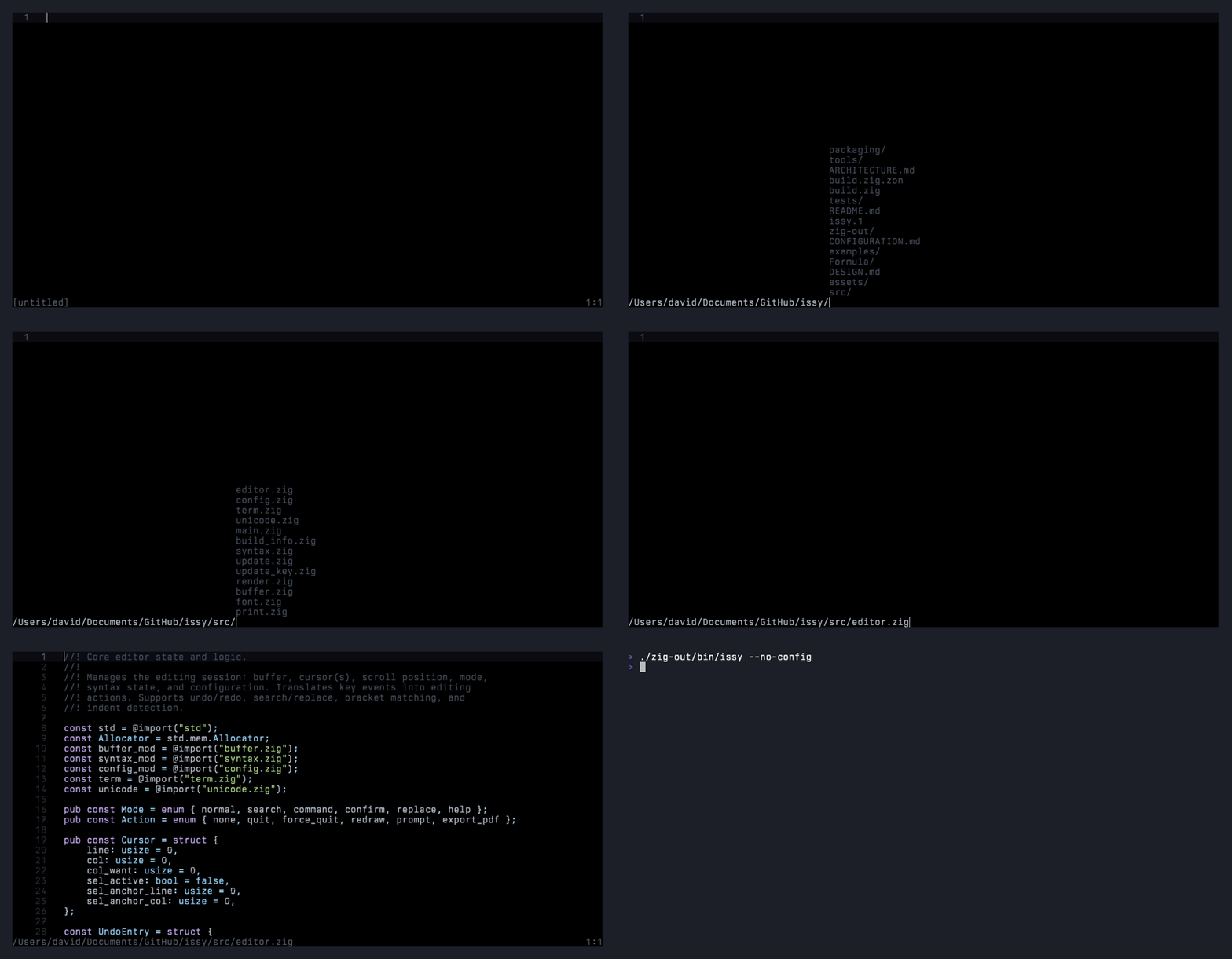
Type a partial directory or filename and press Tab to auto-complete against what’s on disk.
swap files
While a buffer has unsaved changes, issy writes them to a sibling .<name>.swp file every couple of seconds, and removes it on save, reload, file switch, or clean exit (SIGTERM and SIGHUP shut down gracefully and clean up too).
Related: if the open file changes on disk underneath you (a git pull, another editor), Ctrl+R reloads, with a confirm prompt.
per-file cursor memory
Quit a file and issy remembers the cursor position at ~/.cache/issy/positions.txt; reopening the same file restores the caret automatically.
opt-in editing aids
Two behaviors I like but didn’t want to force on anyone, both off by default:
auto_close_brackets = true makes typing an opener insert the matching pair with the cursor between them, as one undo step.
wrap_indent = true makes soft-wrap continuation rows hang under the wrapped line’s own leading whitespace instead of a flat 2 columns.
install
one-line curl (linux, openbsd)
curl -sSL https://raw.githubusercontent.com/davidemerson/issy/main/install.sh | sh
Drops issy at ~/.local/bin/issy, verifies an Ed25519 signature over the release manifest against a public key baked into the script, verifies the binary’s SHA-256 against that signed manifest, seeds ~/.issyrc with commented defaults if you don’t already have one, records the release it just installed in ~/.cache/issy so the first launch doesn’t advertise an update you already have. Prebuilt binaries cover Linux amd64/arm64 and OpenBSD amd64. On platforms without a prebuilt (or when you invoke the installer on macOS), it falls through to zig build -Doptimize=ReleaseSafe from source, with either Zig 0.15.x or 0.16.x on PATH.
Flags: --prefix DIR to relocate, --version VER to pin to a specific release, --no-rc to skip the ~/.issyrc seed, --help for the rest. Prefer to read the script before piping it to a shell? Fetch it with -o install.sh and run it once you’re happy.
Prefer to skip the script entirely? The raw binaries (and the signed manifest to check them against) are attached to every GitHub release.
macos via homebrew
brew tap davidemerson/issy https://github.com/davidemerson/issy
brew install issy
The formula tracks tagged releases (vX.Y.Z), so upgrades are just brew upgrade issy, the same one-liner you’d use for any Homebrew package. No --fetch-HEAD, no uninstall-and-reinstall dance. CI rewrites the formula’s url and sha256 on every tag push via a release-tag job, so the versioned formula stays current without manual edits, and it stamps the release commit and its timestamp into the build so issy --version reports the real SHA and update notifications work.
Want the bleeding edge between releases? brew install --HEAD issy still builds from main, and brew upgrade --fetch-HEAD issy pulls the latest commit.
The formula pins its build dependency to zig@0.15 rather than the unversioned zig formula, which is a moving target: Homebrew bumped it to 0.16 mid-cycle, and at the time that broke the build. issy itself builds on both series now, but the pin keeps Homebrew builds from moving out from under us, carries Apple’s Xcode 26.4 TBD compatibility patch, and is kept in sync with the ZIG_VERSION used by CI.
Prebuilt macOS binaries aren’t shipped because cross-compiled Mach-O from Linux has no code signature and Apple Silicon refuses to run it. Homebrew, or the curl installer (which falls through to a source build on macOS), produces a native host-signed binary that runs on both Intel and Apple Silicon with no xattr or codesign workarounds.
openbsd
The curl installer downloads a prebuilt amd64 binary. Builds are verified on every push by a real OpenBSD 7.9 amd64 VM in CI (openbsd-test job); the full unit and integration suite must pass on OpenBSD before main accepts a merge. An editors/issy port was submitted to ports@openbsd.org at v1.3.1. Once it lands, pkg_add issy will be the preferred path.
Building from source: pkg_add zig then zig build -Doptimize=ReleaseSafe. bash and expect (also via pkg_add) are needed if you want to run the integration test suite.
build from source
Requires Zig 0.15.x or 0.16.x; CI exercises 0.15.2 and 0.16.0. Zig 0.16 moved most of std.fs under std.Io with an explicit capability argument and dropped a handful of std.posix calls. Rather than thread an Io handle through the editor, src/fsx.zig wraps the thirty-odd file, environment, and process operations issy uses and dispatches at comptime on the toolchain version, so the same source builds on both series. Anything outside them is rejected at compile time with an actionable error instead of a page of inscrutable ones.
git clone https://github.com/davidemerson/issy
cd issy
zig build -Doptimize=ReleaseSafe
install -m 0755 zig-out/bin/issy ~/.local/bin/issy
cross compile
Zig makes this trivial for Linux and macOS:
zig build -Dtarget=x86_64-linux-gnu
zig build -Dtarget=aarch64-linux-gnu
zig build -Dtarget=x86_64-macos
zig build -Dtarget=aarch64-macos
Or zig build cross to build all targets at once. The exception is OpenBSD: Zig doesn’t ship OpenBSD libc headers, and modern OpenBSD kills processes that make raw syscalls outside libc, so the OpenBSD release binary is built natively inside the CI VM instead of cross-compiled.
usage
issy [options] [file[:line]]

issy main.zig
issy src/editor.zig:42    # open at line 42
issy draft.md:5           # works for new files too: creates draft.md
issy newdoc.md            # start a new file at that path
issy                      # empty buffer
Command-line options:
| Flag | Description |
|---|---|
--version, -v | Print version and exit |
--help, -h | Print usage and exit |
--config FILE | Use a specific config file |
--theme NAME | Override theme (default, paper) |
--font PATH | TTF/OTF font for PDF output |
--no-config | Skip loading config file |
--print FILE | Export to PDF and exit (no TUI) |
--rollback | Swap in the previous binary (if auto-update has run) and exit |
keybindings
The ones you’d expect, mostly.
| Key | Action |
|---|---|
| Ctrl+S | Save, from any mode (a buffer with no filename prompts for a path, with Tab completion) |
| Ctrl+Q / Ctrl+W | Quit (on unsaved changes: Enter or Ctrl+Q again discards, Ctrl+S saves and stays, Escape cancels) |
| Ctrl+Z / Ctrl+Y | Undo / redo (typing runs coalesce within 500ms, one step per word) |
| Ctrl+C / Ctrl+X | Copy / cut (also push to the OS clipboard via OSC 52) |
| Ctrl+V | Paste the system clipboard via OSC 52 (falls back to the internal clipboard if the terminal won’t answer) |
| Ctrl+Shift+V / Shift+Insert | Terminal-native paste of the clipboard / primary selection, as bracketed paste |
| Ctrl+A | Select all |
| Ctrl+F | Incremental search (Tab toggles whole-word, Up/Down walk matches) |
| Ctrl+G | Find next match |
| Ctrl+H | Search and replace (Tab switches fields, Enter replaces next, Ctrl+A replaces all as one undo step) |
| Ctrl+O | Open file |
| Ctrl+N | New empty buffer |
| Ctrl+P | Export to PDF |
| Ctrl+R | Reload file from disk |
| Ctrl+L | Go to line |
| Ctrl+D | Add cursor at next occurrence of word (and arm a rename) |
| Ctrl+Left / Ctrl+Right | Jump by word |
| Shift+Arrow | Extend selection by character |
| Ctrl+Shift+Left / Right | Extend selection by word |
| Ctrl+/ or F1 | Show keybindings overlay |
Middle-click pastes the primary selection at the click point.
configuration
The installer seeds ~/.issyrc on first run with every setting commented out, so you can see what’s available and uncomment what you want. Unknown keys are ignored; missing keys fall back to compiled-in defaults. The editor watches ~/.issyrc for mtime changes and reloads live, so edits to config land in the running editor without a restart. The reload is debounced until the new mtime has held still for a full tick, so a half-written file from a non-atomic external save is never applied. The full reference is in CONFIGURATION.md in the repo. A minimal example:
tab_width = 4
expand_tabs = true
line_numbers = true
right_margin = 100
cursor_style = bar
font_file = "/path/to/font.ttf"

[theme.paper]
Newer keys worth knowing about: swap_files and system_clipboard (both on by default, see above), auto_close_brackets and wrap_indent (opt-in, see above), and autoupdate (below).
syntax highlighting
C, C++, Zig, Python, JavaScript, TypeScript, Rust, Go, Ruby, Java, Shell, HTML, CSS, JSON, YAML, TOML, Makefile, Dockerfile, Markdown, and TeX/LaTeX. Twenty in total, which covers just about everything I touch on a given day. Language is detected by file extension or well-known filename (Makefile, Dockerfile, Gemfile, shell dotfiles like .bashrc).
Multi-line constructs carry across lines: C block comments, Python triple-quoted strings, JS/TS template literals, and Zig \\ line strings all highlight correctly, even when their opening delimiter is scrolled off-screen. The renderer keeps a per-line syntax-state cache so this stays cheap.
auto update
Release builds check for newer versions on startup. The check is an HTTPS request to a commit.txt asset on the latest GitHub release.
If you’d rather not have this, notify_updates = false disables the check entirely.
home | about | github | mastodon | rss

epoch
1789092085