org
overview
There are three components to my system: task management, priority management, and storage. This is where I keep a record of how I run my system, for myself and others who might be interested.
task management
I’ve used Getting Things Done (GTD), this strangely cultish method by David Allen, since about the time it came out in 2001. That’s a long time now, basically since high school. It has become quite a habit for me, and I would highly recommend anyone start this habit sooner rather than later - you’ll get it wrong a number of times and eventually settle on the fixtures and features of the method which resonate with you. For me, the durable bits have been:
- Inboxes
- Next Actions
- Recurring Actions
- Dependencies (“waiting for”)
- Tags
- Ideas
- Processing (Review)
Things I have not been able to get sticking in the last 20-something years of doing this:
- Strategic work (why am I here, what do I care about, what do I do?). I am terrible at the existential stuff. This is true in life as well as GTD.
- Tasks to Calendar (blocking time for minor tasks). I do this well for large tasks and projects, but small stuff snowplows sometimes, and I’m working on it.
If you’re just starting this journey yourself, it’s a great idea to get the original book, and to check out others’ summaries of their processes, like this one and the excellent GTD For Hackers. Keep in mind that when you read any account of such a method, you probably won’t implement things exactly as others have done. I suspect very few people read “Getting Things Done” and simply do all of it - you’ll figure out what 30% of the method works for you, and do that. You might hack the other 70% into something more bespoke for your own life and workflow.
Whatever you do, consistency and refinement is important, progress not perfection.
inboxes
Inboxes are the single most important part of the whole method. An inbox can be anything, but it’s always a dumping ground, functionally. My most-used inboxes are
- the physical one on my desk at home (for physical things like papers and small objects)
- the physical one on my desk at work
- the digital one in my task application (I use Todoist)
- a notebook I carry with me in my pack
- a notebook I keep on my desk at home / at work
This is occasionally supplemented by any number of ephemeral or contingent inboxes. Maybe you’re traveling and all you have is a napkin. Maybe you’re in some random office you don’t keep stocked with your usual stuff and you grab a piece of paper from the printer and fill it with notes. Whatever.
The important thing is that you build a practice of processing these inboxes. Get stuff out of your head and into these inboxes so that you can stop thinking about that stuff, and do it with the assurance that you have a process by which you will process it into appropriate places later.
processing the inbox
I do this with everything that ends up in an inbox of mine:
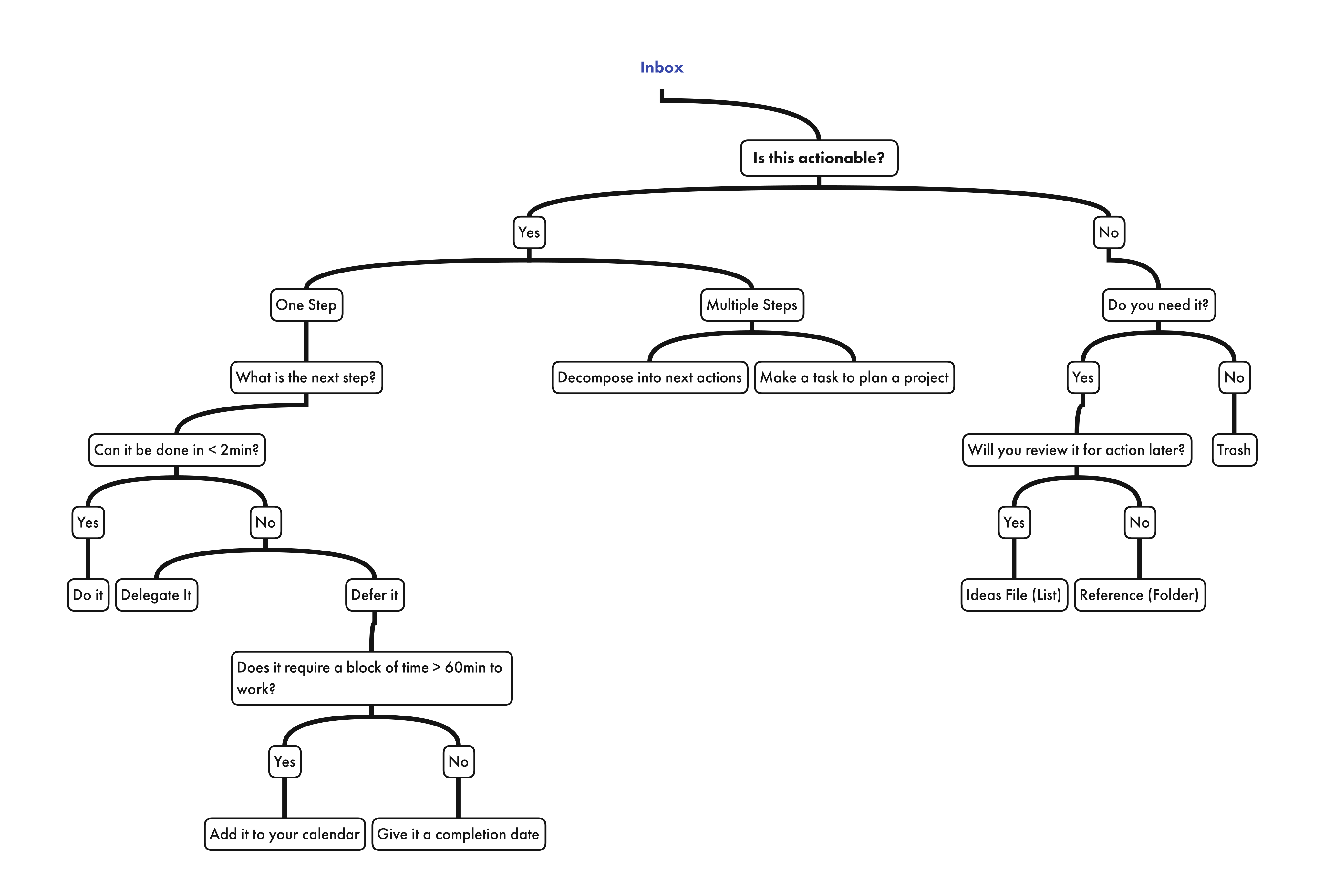
Full size PDF version of the above is here.
On a regular basis, and this has a different meaning for you than it does for me, you need to process your inboxes. I process all my inboxes at least weekly. Each item in the inbox should be subjected to the above flowchart, no exceptions.
Processing can take anywhere from a few minutes to an hour or so. If it’s taking more time than an hour, you’re probably doing it wrong, or you’ve got a huge backlog. I go into detail about how I do my processing in the “processing” section below, but suffice it to say that what we’ve covered so far is:
thing(head, object, instruction, artifact) >
 inbox >
 processing workflow >
 next action / idea / recurring action / storage
lists
The lists, functionally, are super important. Their names less so, but I have selected names which remind me of their functions.
next actions
Next Actions is a list of tasks which are ready to be done. This means that they are already decomposed into a single, specific thing which needs to be done and which is unencumbered by other dependencies. If you need a phone number to call someone to make an appointment for something, put it in the action to avoid such a dependency. Friction kills forward motion. As an example:
"Make an appointment with dentist"
is less good than,
"Schedule a regular cleaning with the dentist"
is less good than,
"Call 212-293-3847 and schedule regular cleaning with Joe Dentist"
This might sound silly and pedantic, but trust me, you’ll learn fast that having the information you need at hand to do the thing you need your future self to do will make that thing more likely to get done. I don’t have a universal standard to apply here other than to say that if you think you need a piece of information to accomplish that action in the future, you should put it in the action itself. If that seems daunting or pointless, it’s possible the action is not in fact a Next Action, but needs to be further decomposed into smaller steps which can be accomplished separately or are dependent on serial execution (serial dependency).
Most things on Next Actions need a date on which you’ll do them, or by which you’ll do them, whichever works for you. It’s ok if some things don’t have dates associated with them, so long as you have validated that they are in fact actionable, and you have some plan or cadence on which you’ll pick one of them up and do it, like a block of time for getting these things done.
recurring actions
Recurring Actions are subject to the same criteria as Next Actions, except they occur at regular intervals. You might need to clean out your old public key identities annually, for example, or write your friend for their birthday on the day each year, or do your GTD processing weekly. The point is simple, but subtle: separate your recurring actions list from your Next Actions list to avoid clutter. Even though they’re similar, it’s way too easy to lose important one-time tasks in a sea of recurring ones you’ll inevitably build over time.
Obviously, since recurring actions need a period on which they will recur, everything in here needs a date for completion or it doesn’t make sense for this list.
ideas
Ideas, in my world, are not subject to as stringent a criteria as actions. Some of them could be actions, but are not actionable yet. Some of them are whole projects, or large amounts of effort which will definitely require decomposition in the future before I can act on them. It’s ok, just get them into your Ideas list, and tag them appropriately (more on tags later) and you’ll revisit them when appropriate.
A few examples of things I keep on my Ideas list:
- Books people have told me to read (and who recommended them, so I can follow up)
- Things I want to make/build in the future
- Gift ideas for people, even vague ones which might not be fully developed yet into something makeable / buyable
- Places I want to visit, and how I found out about them
This is easily the most diverse category of processed items outside my “reference / storage” category. What distinguishes Ideas from mere storage, however, is the possiblity that they’ll be actionable in the future. If something is truly not going to promote action, ever, then it should be archived off into storage, or deleted.
Nothing in Ideas needs to have a date. Some things might, but it certainly isn’t required. Ideas are part of a review process for potential promotion to Actions, so they are fine to be left undated when appropriate.
dependencies (“waiting for”)
This is a list of things that would be Next Actions, except that you delegated them to others, or need others to do them, and you’re waiting on that to happen. Everything in here needs a date on which you’ll follow up with the entity intended to be doing the action.
You delegate more than you think you do, even if you don’t have a traditional relationship of delegation with someone, as might a person in a corporate org structure. That insurance quote you’re waiting on? The book you must read which gets published on February 11 next year? The dates you’re waiting on from your mother so you can plan a visit to see her? All these things are effectively delegations or dependencies which should be tracked here.
This is the one list I implement as a tag rather than as a place, because dependencies arise in every context and I don’t want four copies of the same list. Anything blocked on someone else gets waiting-for, wherever it already lives. The waiting, undated view exists to catch the failure mode: a dependency with no follow-up date is a dependency you have silently stopped tracking, so that view should always be empty.
tags
Tags allow me to sort the jumble of things in the various lists into contexts. Contexts for me fall into three classes, and each class gets a prefix so the tag list stays legible and so filters can match a whole class at once:
p-people I deal with a lot, whether personal or work related.p-personone,p-persontwo.w-my various jobs, employers, clients, and the recurring meetings attached to them.w-myjob,w-exec-weekly.c-categories.c-reading,c-gift,c-phone,c-gtd.
The prefixes are the whole point. Without them the tag list is a flat pile of proper nouns and common nouns with no way to tell which is which, and every filter has to enumerate tags by hand. Enumerated filters rot the moment someone leaves or a category gets renamed. With prefixes, @p-* is every task tied to a human being, and that view keeps working without maintenance.
Structural tags, which describe a task’s state rather than its context, stay unprefixed. There is currently exactly one: waiting-for.
I use these tags to build filters and views as appropriate. If I need to see what phone calls I need to make or schedule, I call up c-phone. If I need to see everything I owe a particular person, I call up their p- tag. If I need to see everything I’m doing for a given client, I call up their w- tag.
A caution learned the hard way: renaming a personal tag does not reliably propagate to tasks living in shared projects. After any rename, check the shared label list too, or you will end up with two tags that look identical and filter differently.
The line between a “project” and a “tag” can be blurry, but generally I try to get away with tags until I clearly need a project, such as when I need to collaborate on something with others, or keep information explicitly separate from other information, such as two customer projects which cannot be commingled. Tags are usually more powerful than projects, without the compartmentalization issues which projects have.
implementation
Everything above is method. This is how it’s actually built, in Todoist, as of this writing. I keep this section current because a method you can’t locate in the tool is a method you don’t have.
structure
One project per context. Inside each, the lists are sections, not separate projects:
Personal,dayjob,consulting,Board Serviceeach containnext,recurring, andideas.FDCPis a property and keeps sections per trade (procurement, exterior, interior, and so on) plus arecurringsection for the maintenance backbone.- Genuinely shared projects stay separate and untouched, because collaboration is one of the two things that earns project status.
Nothing sits unsectioned. An unsectioned task is a task in no list, which is the same as a task in no system.
The rules that keep this from sprawling again, checked quarterly:
- Not more than ten top-level projects.
- Not more than ten sections per project.
- A project must be shared with someone, or must hold information that cannot commingle with anything else. Otherwise it is a tag. This is the same test as before, but written down now, because an untested heuristic drifts.
views
The lists are where things live; the views are how I see across them. Each maps to a step in a review.
Today—today | overdue, everything due across every context.Next actions— everynextsection, plus FDCP’s trade sections.Next: undated— the same, filtered to items with no date. Most next actions should have a date; this is the backlog that quietly stopped being actionable.Waiting forandWaiting, undated— the dependencies list and its failure mode.Ideas— everyideassection.Recurring— everyrecurringsection. Mostly used quarterly to catch rot, since recurring tasks accumulate references to tools you stopped using years ago.People—@p-*, everything tied to a human.Weekly review— a single multi-query view rendering inbox, waiting-for, undated next actions, and ideas in one screen. Four steps of the weekly review in one click.
A note on filter syntax, since it took some checking: section names match across all projects, so /next returns every next-actions section at once, and tag prefixes support wildcards, so @p-* works. Those two facts are what make one flat set of views cover an arbitrary number of contexts.
processing
The processing habit is what allows all of this to work. With assured processing, you will rest easy knowing that things you commit to your inboxes, and thence to various lists, will not be lost. If you do not build a processing habit, this whole thing just becomes a pile-up of things you know you should do but which will get lost, along with the whole point of having a system for, uh, getting things done.
If you feel or sense that your processing habit is not well or regularly implemented, you’ll lose faith in your inbox system, which will cause a feedback into your offloading habit. You’ll start trying to remember stuff lest you drop it, and that’ll inevitably cascade into forgetting stuff, and dropping it anyway.
Anyone with any reasonable amount of things they’re responsible for cannot mentally track them all. Get stuff out of your head (the inbox habit) and process it so you are assured of the integrity of your system, and feel good committing important things to its functioning.
daily review
Every day, I do the following, all of which are very basic:
- Clean out my email inbox, processing emails according to my inbox workflow.
- Review the Next Actions which are scheduled for the day, and defer them or reschedule them if they are not able to be done.
- Check off the things I’ve done, to keep status updated.
- If I took notes or created especially nonstandard inboxes (random slips of paper, artifacts in my bag, pockets, etc), get those processed according to my inbox workflow.
weekly review
Weekly review is more complicated, and takes about an hour for me, normally at the end of a Friday as I’m closing out my week:
- Clear off my desk, process anything that should be an inbox item.
- Empty my todoist inbox, in case anything fell through the cracks (“Inbox” is the default project Todoist commits something to when it has no other direction, so sometimes things end up in there by default or mistake.)
- Review all Next Actions (
Next actions) to ensure things are completed which were completed, and to reschedule, reshuffle, or elaborate on other tasks in there before next week starts. Then checkNext: undatedand either give those items a date or admit they belong in Ideas. - Review Delegations (
Waiting for) to be sure nothing is falling through the cracks, particularly to be sure everything has a date on which you will follow up about that thing.Waiting, undatedshould be empty. - Review Projects under way. Where you have projects in lists or systems outside your main actions/delegations/recurring/ideas, make sure to prune, elaborate, and update those weekly. Often for me, these are in a project management system, but they also might be projects broken out from the main lists because of the clutter they would otherwise produce.
- Review current-week calendar: use it as a prompt for tasks, projects, or things you didn’t commit to your system in the moment, but should.
- Review next-week calendar: use it as a prompt for tasks, projects, or things you need to commit to your system before next week occurs. Also reorder and deconflict next week while you’re at it, since you’re probably quadruple booked for something.
- Update any status dashboards, particularly the ones you owe folks you work with. This might not be relevant to you, but it’s a good time to do it if you must.
- Review your Ideas list. Promote things to Actions where appropriate, or elaborate on things which have new details.
quarterly review
Quarterly, I only do a few things, but they are more time consuming when they need to be done:
- Rethink any Projects which should be demoted to tags, or tags which should be promoted to projects. Apply the test rather than the vibe: shared, or cannot commingle, or it’s a tag. Check the counts against the caps while you’re in there.
- Work the
Recurringview end to end. Recurring tasks rot in a way one-time tasks don’t, because nothing forces you to reread them. Look for references to tools you no longer use, recurrence strings that have accreted junk over the years, and tasks whose whole premise has expired. - Clean up old stuff to storage where it’s no longer needed.
- Make sure any integrations between systems (such as calendar integrations with your task management app, availability integrations with the links you send out for scheduling, or any agent connectors with access to your mail and tasks) are working and properly configured. For anything holding an OAuth grant, confirm the scope is still the minimum you need and revoke what isn’t.
annual review
I’m terrible at this, but I do make a stab at doing the stuff I consider “existential”. What do you do? What do you want to be doing? What even are you? Honestly, it usually devolves into an extra-big rethink of my org structure annually, and I can’t claim to have had any profound insight into my being, but maybe you’ll have more luck. The GTD Methodology formally treats this with more detail and weight if you’re interested in trying yourself, it’s called “Focus Horizons” there.
For my part, I spend about half a day per year just carefully thinking through my system and updating stuff like this page with how I’ll modify it or what I need to do better. My system is too tactical to get wrapped up in the big stuff.
priority management
This one isn’t complicated, but it’s a handy tool when deconflicting the stuff you think you need to do (the whole body of your tasks) with the reality of time, and how much you can accomplish. Some people like to use OODA loops (I don’t), some people like to use matrices (I do). What you use isn’t important, just make sure you have a good way to apply some criteria with which you’re familiar to the tasks you’ll soon have in excrutiating detail from the above processes.
Here I’ve outlined the two systems I personally use. They are both 2x2 matrices, don’t be too confused, there’s nothing to this. Heck, you don’t even need to actually fill out the matrix with tasks, unless that’s your jam. I personally just use these frameworks as ways to think about any given task I’m presented.
Impact-Effort Matrix
There are four boxes in this 2x2 matrix, high/low impact, and high/low effort. I rank things to be done according to this criteria:
(do first)High Impact, Low Effort: Quick Wins. These are the tasks or projects that you should tackle first. They offer the highest return on investment for your effort.(do second)High Impact, High Effort: Major Projects. These items are important but require significant time and resources. Plan and execute them after the quick wins.(do third)Low Impact, Low Effort: Fill-ins. These can be done when you have spare time. They won’t make a big difference but are easy to complete.(do last, defer)Low Impact, High Effort: Thankless Tasks. These tasks require a lot of effort but don’t provide much return. Avoid or minimise these tasks whenever possible.
Eisenhower Matrix
Similar to the Impact-Effort Matrix, this is a 2x2, but ranking importance (instead of impact) and urgency (instead of effort). It also includes delegation and deletion concepts, which can be helpful if what you need is a filter more than an order of operation.
(do soon)Important and urgent: do it. These are the tasks that you want to do as soon as possible. Crises, pressing problems and other things where not acting now has negative consequences.(schedule)Important but not urgent: schedule it. Find a time for these tasks and do them then. This quadrant is typically where deep work happens – tasks that contribute to your projects or long-term goals.(delegate)Urgent but not important: delegate it. If you can, find someone who can do these tasks for you. If you can’t delegate it, schedule it but always try to do the important-but-not-urgent tasks first. These are often administrative tasks or things that have deadlines but aren’t critical.(delete)Not urgent and not important: don’t do it. These tasks aren’t worth your time and you shouldn’t do them at all. Avoidance activities, busy work and entertainment goes into this quadrant.
storage & reference
This is where the output of tasks goes, where documents I generate, code I produce, photos I store, and reference materials I want to keep hang out. Nothing in here is necessarily actionable, that’s why it’s reference or for storage.
The biggest challenge for me has been to find a method which is extensible to an almost arbitrary scope while remaining accessible to my recollection of where things should be. I have implemented a system inspired by Johnny Decimal
Rules:
- not more than three levels deep for folders
- not more than ten subcategories per second or third level taxonomy
- where used, dates are in
YYYY-MM-DDformat. This is very important for sorting and filtering - rules were meant to be broken sometimes, as when photos are simply better stored by date, and when reading is better stored by the Dewey Decimal Categories.
Like the Library of Babel, this results in a taxonomy which is very large, but not infinite, so you can at least orient yourself a bit.
I keep a PDF reference of my folder structure here, both for my own records and for anyone who would like to use it to make their own folder structure.
top level
I have a full-time job, a side-gig or two, and, naturally, a personal life. As such, I’ve implemented projects as the first layer of my taxonomy.
000- [Reserved for Management]100- Emerson200- Extended Family500- Consulting, Company Management501to899- Consulting, per-customer900- [Reserved]901to999- Full-time Employment & Board Work
second level
Areas are the second layer of my taxonomy. There are never more than ten areas per project. Under 100 Emerson each area starts with 100 and possesses a decimal identifier, such as 10 for Personal Administration. The combined title for personal administration, when is 110 Personal Administration. Here’s what I have under 100 Emerson
110Personal Administration120Home, Auto, Staff130Reading140Technology150Multimedia160Projects, Travel, Hobbies170Archives180Offspring
third level
Categories are the third layer of my taxonomy. There are never more than ten categories per area. As an example, within 110 Personal Administration I have the following categories:
111Tax Returns112Trust & Will113Insurance114Identification & Representation115Personal Plans116Personal Investments117Templates & Design Assets118Health Information
reading
I use the standard Dewey Decimal high level categories for digital reading material which I store. Note that this is different than my reading list, for which I have a web app hosted here.
132.01Computer Science, Information, General Works132.02Philosophy & Psychology132.03Social Sciences132.04Language132.05Pure Science132.06Technology132.07Arts & Recreation & Travel132.08Literature132.09History & Geography132.10Leadership and Business
Projects
Within 160 Projects, I give each project a random unique three-digit alphanumeric suffix. This allows me to have a large space of potential project names. As an example:
160.a15org160.p4jchainsaw logmilling160.w6bwelding cart
photos & music
Photos & Music (generally referred to as media) are somewhat exempt from decimalization, since I’ve found no better way to store them than by-date. Dates are always in YYYY-MM-DD format.
home | about | github | mastodon | rss

epoch
1789092085